Skip to content
en
United States USD
Skip to product information

Free shipping on orders of $250+ · under 150 lbs

Pearl Coating™ 15oz Sublimation White Mug Case of 36 - Pallet Pricing

Sale price $68.40
Regular price $88.20You saved$19.80 OFF22% off

Shipping calculated at checkout

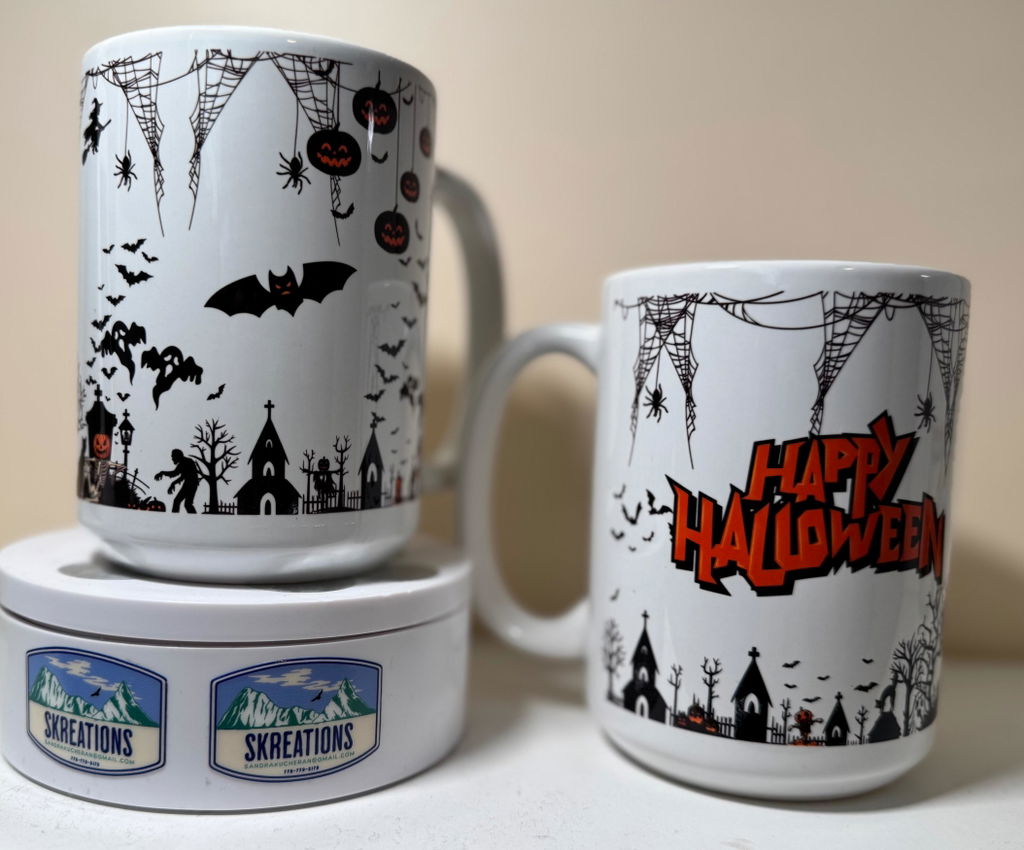
These Premium High-Quality AAA Sublimable Mugs feature a glossy surface for printing brilliant, vivid images and designs in full color. They're the perfect addition to every kitchen and desk, and they are great for individual customers, businesses, and promotional giveaways.

Pallet Order: What You Need to Know

  • 1 pallet = 35 cases (1,260 mugs). Multi pallet orders start at 70 cases.
  • Freight is included to commercial addresses in the contiguous US.
  • You must have a loading dock or forklift. Without proof, a liftgate fee is added.
  • Residential, rural or remote addresses may have extra fees. We confirm before shipping.
  • If delivery fails because of the receiving location, any extra carrier charges (redelivery, storage, return freight) are paid by the customer.
  • Inspect on arrival and note any damage before signing.

Minimum order: 70 · Sold in multiples of 35

Description

Pearl Coating™ 15oz Sublimation White Mug Case of 36 - Pallet Pricing

Stock up on our 15oz sublimation mug by the pallet. The Pearl Coating™ 15oz mug has a bright white gloss finish for vivid, full-color image transfers and is dishwasher safe, tested for 3,500+ wash cycles. Its larger capacity makes it ideal for photo gifts, branding, and promotional giveaways, and it is built for print shops and high-volume sellers who need consistent, repeatable results order after order.

Why Print Shops Choose This Mug

  • Pearl finish: super white Pearl Coating™ enhances color vibrancy and sharpness
  • Large 15oz capacity: ideal for coffee lovers and larger designs
  • Bright white gloss finish
  • Dishwasher and microwave safe: tested for 3,500+ wash cycles, heat resistant
  • FDA compliant, lead and cadmium free
  • CA Prop 65 approved
  • Passed Ceramic Platinum 32 Handle Strength Test

Product Details

  • Pallet quantity: 35 cases (1,260 mugs)
  • Quantity per case: 36 mugs
  • Printable area: approx. 6" x 4.25" (design up to 4.60" with bleed)
  • Mug element: 11oz/15oz compatible
  • Wrap compatibility: E-MW-1115 (11oz/15oz mug wrap)
  • Color: White
  • Size: 15oz

Compatible Equipment

  • Joto Digital Mug Press, single, dual, or multi station (11oz/15oz elements)
  • Convection oven, use with mug wrap or shrink wrap (not included)

Pressing Instructions for Mug Press

  • Print the image in mirror mode and trim for easier positioning
  • Secure the transfer paper to the mug with heat resistant tape, image facing the surface
  • Set temperature to 360°F (180°C) and time to 160 seconds
  • Use light pressure to avoid damaging the mug
  • Make sure the press has reached temperature before the countdown begins
  • After pressing, peel the paper hot and dunk the mug in warm water
  • Let the mug air dry on a flat surface
Instructions
Peel Hot
Equipment Mug Press or Convection Oven
Image Mirror
Pressure Light
Application Temperature 360°F (180°C)
Time 160 seconds
Mug Element 11/15 oz Mug
Mug Press Imaging Instructions Tape imaged sublimation paper onto your mug. Place the image toward the mug.
Ensure that you have set the correct temperature & time for your mug press model.
Place the mug into your mug press. Ensure the mug press has reached the temperature.
Close Mug Press.
a) Mug presses with idle temperatures will start raising the temperature until press temperature is reached. Then it will start counting down.b) Mug presses without an idle temperature will start counting down immediately.Note: It is normal to see the temperature lower when you close the press. This has been accounted for.
Once pressing is done, immediately peel off sublimation paper.
 Dunk in warm water. Leave on the Table to dry.

For time and temperature, please follow the instructions that came with your mug press.  If you bought a mug press from us, the suggested time and temperature for our Single Station, Double Station, and Multi-Station Mug Press are listed above. For any other mug presses, please click on the SUPPORT, DOWNLOADS & TEMPLATES tab, and download the instructions from there.
Convection Oven Instructions Press Temperature: 400°F |  Time: 12-15 minutes (test in your oven for accurate time) | Peel: Hot

Tape imaged sublimation paper onto your mug. Place the image toward the mug. 
Wrap silicone wrap around mug surface and clasp at the handle
Ensure that you have set the correct temperature & time for your convection oven.
Place the mug into your convection oven and close the convection oven's door.
Once the time is done, remove the wrap and immediately peel off sublimation paper.
 Dunk in warm water. Leave on the table to dry.
General sublimation blanks instructions
Downloads
Description

Pearl Coating™ 15oz Sublimation White Mug Case of 36 - Pallet Pricing

Stock up on our 15oz sublimation mug by the pallet. The Pearl Coating™ 15oz mug has a bright white gloss finish for vivid, full-color image transfers and is dishwasher safe, tested for 3,500+ wash cycles. Its larger capacity makes it ideal for photo gifts, branding, and promotional giveaways, and it is built for print shops and high-volume sellers who need consistent, repeatable results order after order.

Why Print Shops Choose This Mug

  • Pearl finish: super white Pearl Coating™ enhances color vibrancy and sharpness
  • Large 15oz capacity: ideal for coffee lovers and larger designs
  • Bright white gloss finish
  • Dishwasher and microwave safe: tested for 3,500+ wash cycles, heat resistant
  • FDA compliant, lead and cadmium free
  • CA Prop 65 approved
  • Passed Ceramic Platinum 32 Handle Strength Test

Product Details

  • Pallet quantity: 35 cases (1,260 mugs)
  • Quantity per case: 36 mugs
  • Printable area: approx. 6" x 4.25" (design up to 4.60" with bleed)
  • Mug element: 11oz/15oz compatible
  • Wrap compatibility: E-MW-1115 (11oz/15oz mug wrap)
  • Color: White
  • Size: 15oz

Compatible Equipment

  • Joto Digital Mug Press, single, dual, or multi station (11oz/15oz elements)
  • Convection oven, use with mug wrap or shrink wrap (not included)

Pressing Instructions for Mug Press

  • Print the image in mirror mode and trim for easier positioning
  • Secure the transfer paper to the mug with heat resistant tape, image facing the surface
  • Set temperature to 360°F (180°C) and time to 160 seconds
  • Use light pressure to avoid damaging the mug
  • Make sure the press has reached temperature before the countdown begins
  • After pressing, peel the paper hot and dunk the mug in warm water
  • Let the mug air dry on a flat surface
Instructions
Peel Hot
Equipment Mug Press or Convection Oven
Image Mirror
Pressure Light
Application Temperature 360°F (180°C)
Time 160 seconds
Mug Element 11/15 oz Mug
Mug Press Imaging Instructions Tape imaged sublimation paper onto your mug. Place the image toward the mug.
Ensure that you have set the correct temperature & time for your mug press model.
Place the mug into your mug press. Ensure the mug press has reached the temperature.
Close Mug Press.
a) Mug presses with idle temperatures will start raising the temperature until press temperature is reached. Then it will start counting down.b) Mug presses without an idle temperature will start counting down immediately.Note: It is normal to see the temperature lower when you close the press. This has been accounted for.
Once pressing is done, immediately peel off sublimation paper.
 Dunk in warm water. Leave on the Table to dry.

For time and temperature, please follow the instructions that came with your mug press.  If you bought a mug press from us, the suggested time and temperature for our Single Station, Double Station, and Multi-Station Mug Press are listed above. For any other mug presses, please click on the SUPPORT, DOWNLOADS & TEMPLATES tab, and download the instructions from there.
Convection Oven Instructions Press Temperature: 400°F |  Time: 12-15 minutes (test in your oven for accurate time) | Peel: Hot

Tape imaged sublimation paper onto your mug. Place the image toward the mug. 
Wrap silicone wrap around mug surface and clasp at the handle
Ensure that you have set the correct temperature & time for your convection oven.
Place the mug into your convection oven and close the convection oven's door.
Once the time is done, remove the wrap and immediately peel off sublimation paper.
 Dunk in warm water. Leave on the table to dry.
General sublimation blanks instructions
Joto Imaging Supplies Main Slider Image
Pearl Coating™ 15oz Sublimation White Mug Case of 36 - Pallet Pricing
Drawer Title
Similar Products