
Skip to content
en
United States USD
Skip to product information

Free shipping on orders of $250+ · under 150 lbs

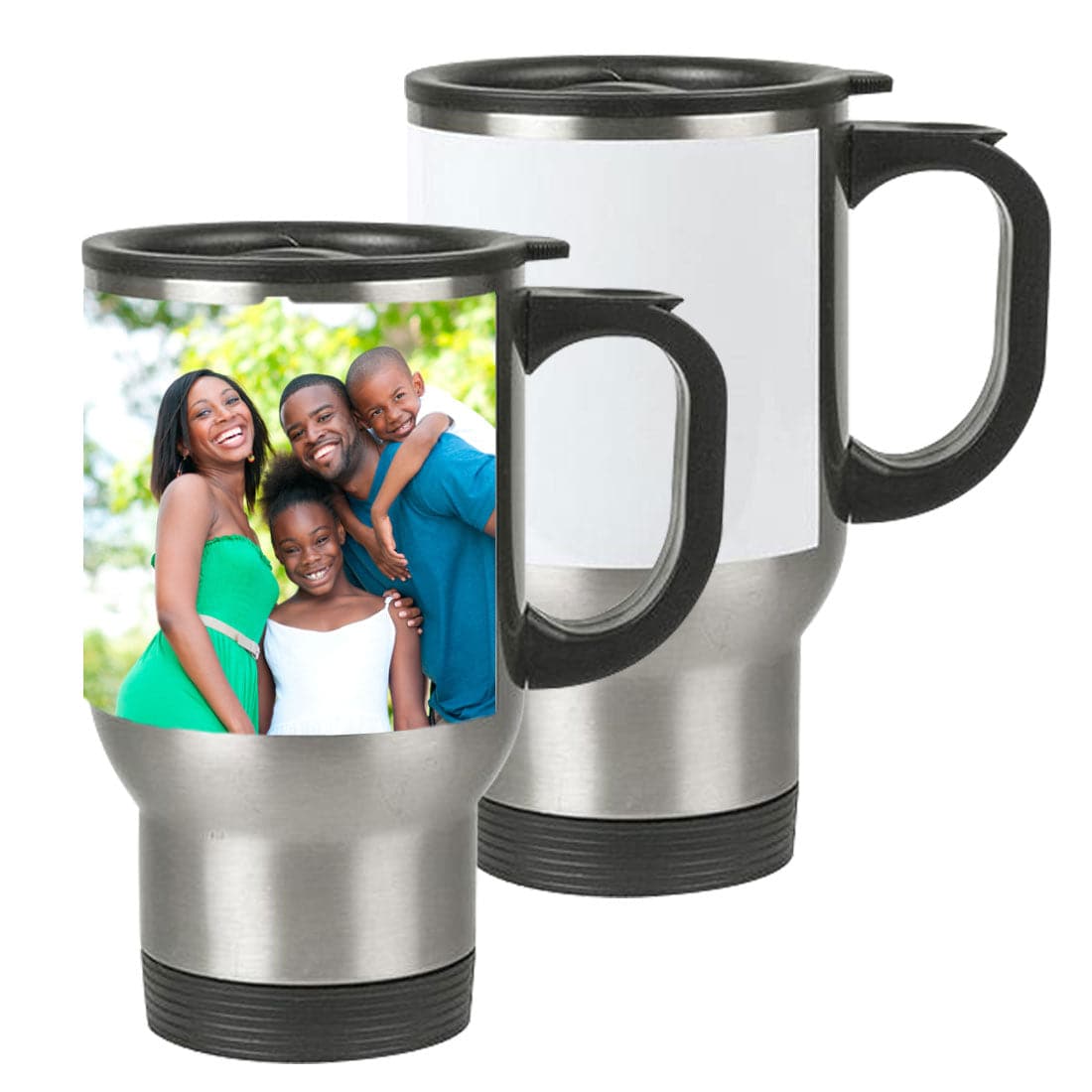
14oz Sublimation Stainless Steel Travel Mug with White Patch

Sale price $2.99
Regular price $6.99You saved$4.00 OFF57% off

B-MUG-SS-SLWP

Shipping calculated at checkout

14oz Travel Mugs with the white patches are the indispensable companion for your daily commute, keeping your beverage securely contained from the car to the cubicle. Tapered at the bottom, these mugs fit most cup holders and come with a lid.

JOT Imaging Essentials logo

Why Choose JOT?

Since 1989, we've spent 35+ years in this industry. As an authorized dealer for 10+ brands, including Epson, Sawgrass, Uninet, Mutoh and xTool, we ship from 3 warehouses across the US, and our technicians are a call away at 1-800-565-5686.

Description

14oz Sublimation Travel Mug with White Patch

Take your hot drinks on the go with this durable 14oz stainless steel travel mug featuring a sublimatable white patch. Perfect for commutes, office hours, or outdoor activities, this mug fits most cup holders and comes with a secure-fitting lid to prevent spills.

Key Features

  • Stainless steel construction with white sublimation patch
  • Secure-fitting lid included
  • Fits most car cup holders
  • Printable with both sublimation and laser transfers
  • Great for custom gifts and promotional use

Printing Method

  • Joto Digital Mug Press - 11oz/15oz Mug Element

How to Sublimate

  1. Remove lid from the travel mug
  2. Design and print your image (mirror mode) using sublimation ink
  3. Trim and tape image to the mug using heat-resistant tape
  4. Set mug press to 365°F and press for 45 seconds with light pressure
  5. Remove the mug and peel the paper hot
  6. Let the mug cool before use

Specifications

  • Size: 14oz (~6" H x 3.5" Top Diameter)
  • Printable Area: 8.25″ x 3.0″
  • Color: Silver with White Patch
  • Dishwasher Safe: No
  • Microwave Safe: No

Buy More, Save More

  • 24–65 units: $6.49 each
  • 66–119 units: $5.99 each
  • 120+ units: $4.99 each

Combine sleek design with personalization—make your 14oz stainless steel travel mugs truly one of a kind.

Instructions
Peel Hot
Equipment Mug Press
Image Mirror
Pressure Light
Application Temperature 365°F (182°C)
Time 45 seconds
Mug Element 11/15 oz Mug
Mug Press Imaging Instructions Remove the lid from the travel mug.
Design your image and print it out on sublimation paper with a sublimation ink printer.
Tape imaged sublimation paper onto your white stainless steel insert face toward the mug.
Set the mug press at 365F for 45 seconds. If your press has an idle and press temperature setting, adjust the time accordingly.
Ensure the mug press has reached temperature. Place the insert into your mug press.
Close Mug Press.
Once pressing is done, open the mug press, and take the insert out of the press. Use gloves or heat resistant cloth to handle the hot insert
Peel sublimation paper off. and leave it to cool off completely.

Note: These instructions are for Joto Mug Presses. Temperature and time settings are only a guide/starting point, some mug presses may require some fine tweaking of the temperature and time. Generally, we suggest using 360F at 250 seconds as a guide if you don't own a mug press sold by Joto.
General sublimation blanks instructions
Downloads
Description

14oz Sublimation Travel Mug with White Patch

Take your hot drinks on the go with this durable 14oz stainless steel travel mug featuring a sublimatable white patch. Perfect for commutes, office hours, or outdoor activities, this mug fits most cup holders and comes with a secure-fitting lid to prevent spills.

Key Features

  • Stainless steel construction with white sublimation patch
  • Secure-fitting lid included
  • Fits most car cup holders
  • Printable with both sublimation and laser transfers
  • Great for custom gifts and promotional use

Printing Method

  • Joto Digital Mug Press - 11oz/15oz Mug Element

How to Sublimate

  1. Remove lid from the travel mug
  2. Design and print your image (mirror mode) using sublimation ink
  3. Trim and tape image to the mug using heat-resistant tape
  4. Set mug press to 365°F and press for 45 seconds with light pressure
  5. Remove the mug and peel the paper hot
  6. Let the mug cool before use

Specifications

  • Size: 14oz (~6" H x 3.5" Top Diameter)
  • Printable Area: 8.25″ x 3.0″
  • Color: Silver with White Patch
  • Dishwasher Safe: No
  • Microwave Safe: No

Buy More, Save More

  • 24–65 units: $6.49 each
  • 66–119 units: $5.99 each
  • 120+ units: $4.99 each

Combine sleek design with personalization—make your 14oz stainless steel travel mugs truly one of a kind.

Instructions
Peel Hot
Equipment Mug Press
Image Mirror
Pressure Light
Application Temperature 365°F (182°C)
Time 45 seconds
Mug Element 11/15 oz Mug
Mug Press Imaging Instructions Remove the lid from the travel mug.
Design your image and print it out on sublimation paper with a sublimation ink printer.
Tape imaged sublimation paper onto your white stainless steel insert face toward the mug.
Set the mug press at 365F for 45 seconds. If your press has an idle and press temperature setting, adjust the time accordingly.
Ensure the mug press has reached temperature. Place the insert into your mug press.
Close Mug Press.
Once pressing is done, open the mug press, and take the insert out of the press. Use gloves or heat resistant cloth to handle the hot insert
Peel sublimation paper off. and leave it to cool off completely.

Note: These instructions are for Joto Mug Presses. Temperature and time settings are only a guide/starting point, some mug presses may require some fine tweaking of the temperature and time. Generally, we suggest using 360F at 250 seconds as a guide if you don't own a mug press sold by Joto.
General sublimation blanks instructions
14 oz Sublimation Stainless Steel Travel Mug with White Patch
14oz Sublimation Stainless Steel Travel Mug with White Patch
Drawer Title
Similar Products